Remove text from a screenshot
Clear names, numbers and messages from a screenshot before you share it.
No photo handy?
FreeNo sign-upPhotos stay on your device
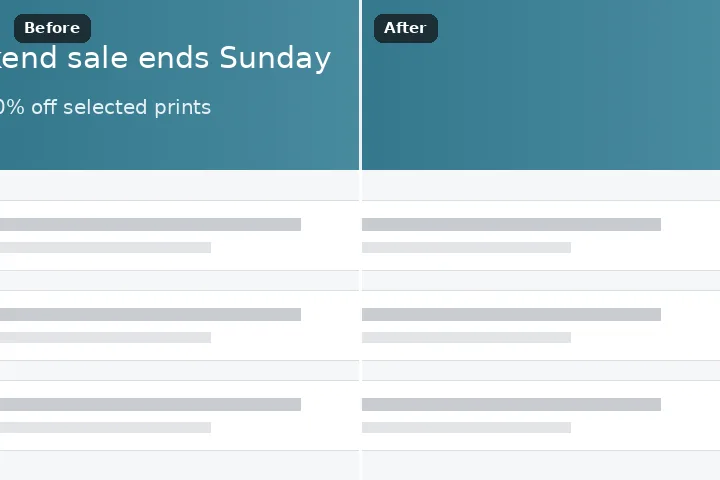
Screenshots are flat colours and gradients, and a patch search would only add noise to them. Box the text; the flat fill fits a solid colour or straight gradient to the pixels around the box and fills with it, and the result saves as PNG so no JPEG ringing appears around the edges.
Why a screenshot needs its own fill
Interface backgrounds are not texture. A chat bubble is one colour, a header is a gradient, a slide is white. Fill them by copying patches and you get faint blotches that never existed — invisible on a photograph, obvious on a flat grey bar. The flat fill instead fits a plane — a solid colour, or a colour changing evenly in one direction — to the ring of pixels just outside the box, and fills the box with it.
Before it fills, it measures how well the ring fits: if the rim differs from a plane by more than seven levels on average, the background is a photograph or a pattern, and a flat patch would show. Then it refuses, the edge march fills the box instead, and the record says which ran and why. The export defaults to PNG, because JPEG's blocks ring around sharp UI edges.
Do not alter screenshots of conversations, payments, results or records that you will show to anyone as genuine. Cover what must be hidden with the photo redactor instead.
Working it
- Paste or open the screenshot. Ctrl V pastes straight from the clipboard.
- Box the text. Draw the rectangle over the words with a few pixels of margin inside the background they sit on.
- Erase. The flat fill fits the background from the box's edge and fills it.
- If it refused. The record says the edge was textured and the edge march filled it. That is right for text over a photo or a pattern.
- Save as PNG. Selected already. The file has the screenshot's exact dimensions.
What this mode will not do
- Text over a photo, a pattern or a blurred backdrop is not on a flat background. The flat fill refuses there; the edge march or the patch search does the work.
- A box that straddles two UI areas — a button and the bar under it — fits neither. Box each area separately.
- Radial gradients and drop shadows are approximated by a straight gradient.
- Changing a screenshot that will be shown as a record is not a fill problem. Use a cover.
Questions about this mode
Is my screenshot uploaded?
Which engine is best for UI text?
Why did it say the edge was textured?
Why PNG?
Should I use this to hide a phone number or an email?
Related ways in