Remove a shadow from a photo
Brush over a harsh shadow and it lifts to match the light around it.
No photo handy?
FreeNo sign-upPhotos stay on your device
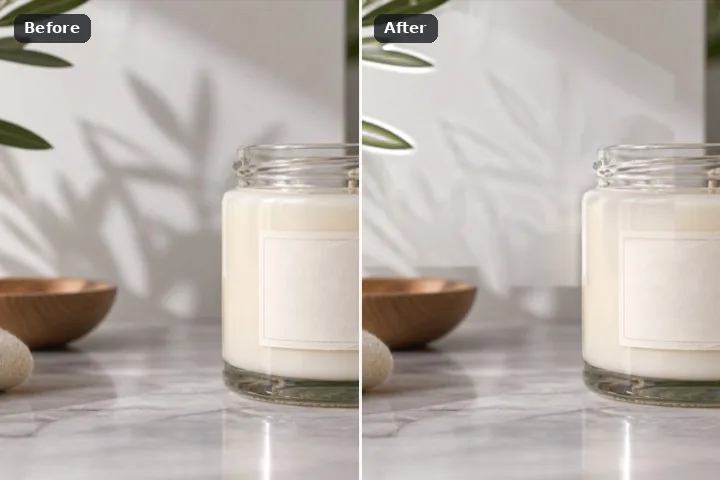
The shadow is not replaced, it is relit: its own pixels — the grain of the pavement, the weave of the cloth — are kept, and only their tone and colour are moved to what the lit surround implies. Select it by colour, feather the edge so the penumbra grades, and erase.
Why a shadow is relit rather than filled
Every other engine on this site throws the pixels under the region away and builds new ones. That is wrong for a shadow, because nothing is hidden under a shadow — the pavement is right there, just darker. Replacing it with texture copied from a few feet away swaps real detail for borrowed detail and usually shows as a patch with slightly different grain.
The shadow lift keeps every pixel and changes only its low-frequency tone. The lit tone around the shadow is carried inward from the rim, both it and the shadow's own tone are averaged over the same window, and each shadowed pixel is multiplied by the ratio between them, channel by channel, so a blue-tinted shade becomes neutral again. The penumbra — the soft edge — is handled by the feather: the correction fades across it instead of stopping at a line.
A shadow on a passport, visa or exam photograph is a reason to retake the photograph, not to edit it: those photographs must be unaltered. The guide on photos you should not edit says what to do instead.
Working it
- Click inside the shadow. Similar colour selects the connected shade. Hold E (or choose Take out) to remove anything it grabbed that is not shadow.
- Or paint the object and use Shadow & spill. With the brush, paint the object casting the shadow, then press Shadow & spill: the darker pixels beside it are proposed, shown lighter, for you to add or discard.
- Feather across the penumbra. Six pixels is the default here. A soft shadow wants more; a hard noon shadow wants less.
- Erase with Shadow lift. It is selected already. Nothing is copied in; the region is relit.
- Compare the edge. If a faint outline survives, Grow 2 px and run again from the original with undo.
What this mode will not do
- A shadow so dark that the detail inside it is crushed to black has nothing left to relight; the lift brightens noise. Use the patch search there.
- Where the shadow falls across two different surfaces — wall and floor — select and lift them separately, because each has its own lit tone.
- A shadow across a face is not something this page will fix; nor should it be fixed on an identity photograph.
- The lift matches tone, not specular highlights: a shiny surface that would have reflected light in the sun stays matte.
Questions about this mode
Is my photo uploaded to remove the shadow?
Which engine should I use for a shadow?
Can it remove the shadow on a passport photo?
Why is there a faint edge left?
Does it download anything?
Related ways in

Remove Shadow