Photo redactor
Cover faces, plates or private details with a solid block before you share.
No photo handy?
FreeNo sign-upPhotos stay on your device
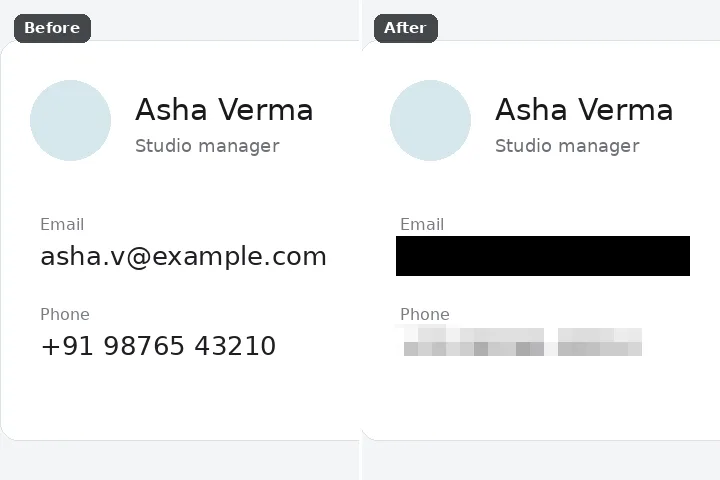
Box or paint what must not be seen, and it is covered: solid black, solid white, a colour sampled from around it, or pixelation in blocks of at least twelve pixels. Never a plausible fill — a redaction should show that something was removed, not pretend nothing was there.
Why a redaction is a cover, not a fill
Every other mode on this site tries to make a removal invisible. A redaction must do the opposite. A plausible fill over a name or an account number tells whoever sees the picture that nothing was ever there — which is false, and in a document someone relies on, misleading. An opaque box says plainly: something was here, and it was taken out.
So the cover engine has none of the softness the others have. There is no feather, no inner soft edge and no strength below full: the covered pixels are replaced outright, transparent ones included. Pixelation averages blocks of at least twelve pixels — coarse enough that small text cannot be read back out of it — and the export writes a flat picture with no layers and no metadata, so nothing hides under the cover in the file.
For sharing an Aadhaar, UIDAI's own masked Aadhaar (first eight digits hidden) is the official route; a cover on a photograph of the card is a personal-copy convenience, not a substitute. Do not alter identity documents — cover a copy only for your own records.
Working it
- Box what must be hidden. The rectangle is selected. Paint with the brush for irregular areas.
- Choose the cover. Black, white, edge colour or pixelate, in the Fill panel. Block size never goes below 12 pixels.
- Erase. The cover is applied opaquely, hard-edged.
- Check every one. Compare at 1:1. A cover that misses a single digit hides nothing.
- Save. PNG keeps the cover exact; the file is flat and carries no metadata.
What this mode will not do
- A cover hides pixels in this file. It does nothing about copies already sent, other versions, or text recognised elsewhere.
- Pixelation of large text or faces can sometimes still be guessed; for anything that matters, use a solid cover.
- It will not find faces, numbers or names for you — you choose every region.
- It does not edit PDFs, documents or text layers; it covers pixels in a picture.
Questions about this mode
Is my photo uploaded to redact it?
Which engine should a redaction use?
Can a pixelated area be reversed?
How should I share an Aadhaar card?
Is anything left in the file's metadata?
Related ways in

Photo Redactor