Clean a signature scan
Turn a phone photo of your signature into clean white paper and crisp ink.
No photo handy?
FreeNo sign-upPhotos stay on your device
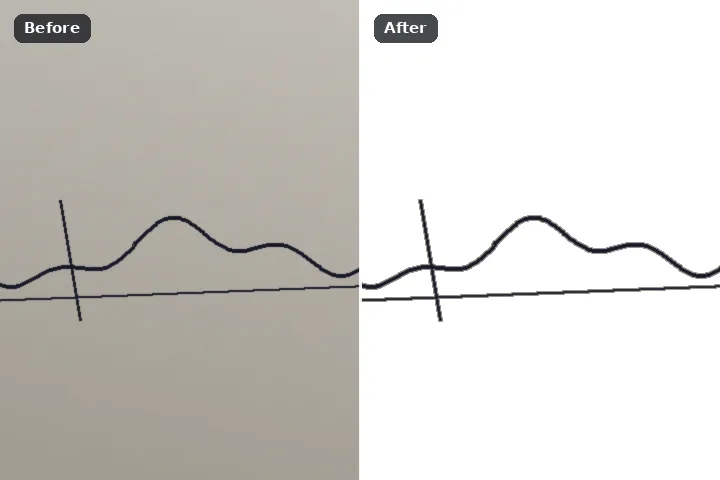
Whiten the paper around the ink, brush out stray marks, crop to the signature with a small margin, and save a JPG inside a KB window — the quality is searched first and the size steps down only if it must. The ink strokes themselves are never smoothed, thickened or redrawn.
Why the ink is left exactly as it is
Exam and application portals ask for a signature as a small JPG, often between 10 and 20 KB, black ink on white. A phone photo of a signature is grey paper with a shadow across it, megabytes in size, with the signature a small part of the frame. Getting from one to the other is three steps — whiten, crop, compress — and none of them needs the strokes touched.
Whiten the paper splits ink from paper by the picture's own brightness histogram, keeps the ink and a one-pixel margin around it, and fills everything else with white. Crop to the signature then cuts to the ink with a small border. The KB window searches JPEG quality from 100 down until the file fits; only if quality alone cannot get there do the dimensions step down 5 % at a time, and the result states its real size, dimensions and quality. A file is never padded with junk bytes to reach a minimum.
Sign it yourself. This cleans a scan of your own signature for an upload; it must never be used to copy, alter or place someone else's signature.
Working it
- Open the scan or photo. Black ink on white paper, evenly lit, the signature filling a good part of the frame.
- Whiten the paper around the ink. One press. The paper becomes white; the strokes are untouched.
- Brush out stray marks. Dots, smudges, the edge of a ruled line: paint them and erase — the paper fill is selected.
- Crop to the signature. A small margin is kept; the picture reopens as a lossless PNG at the cropped size.
- Pick the KB window and save. 10–20 KB or 4–30 KB, or your own numbers. The readout gives the final KB, dimensions and quality — check them against your portal's notice.
What this mode will not do
- Pale blue ink on grey paper may not separate cleanly from the paper; rescan in black ink with more light.
- It does not smooth, straighten or redraw a signature, and never will.
- It cannot promise a portal will accept the file; portals change their rules every cycle.
- A minimum that cannot be reached honestly is reported, not padded: a tiny signature may simply be smaller than the minimum at quality 100.
Questions about this mode
Is my signature uploaded anywhere?
What KB size do exam portals ask for?
Which engine is used?
Why is my file bigger than the maximum?
Does 1 KB mean 1,000 or 1,024 bytes?
Related ways in