Clone stamp tool
Copy a clean patch over a mark. You see what it will copy before it does.
No photo handy?
FreeNo sign-upPhotos stay on your device
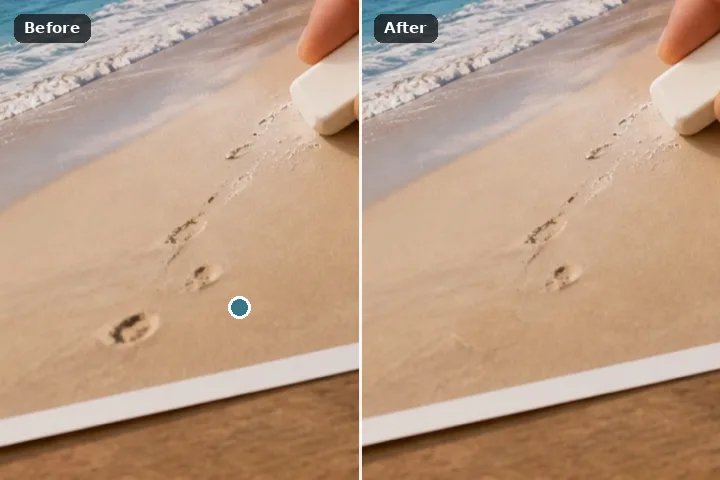
Paint the region, place the source pin where the right texture is, and the painted area shows what the pin would copy into it — live, before anything is committed. Aligned copies every area from the same offset; non-aligned copies every area from the pin itself. Strength and hardness shape the blend.
Why the clone shows its answer first
The clone stamp is the oldest retouching tool and the one that needs the most judgement: the right source is the one whose texture, light and lines continue into the hole, and only a person looking can pick it. So here the choice is made by looking. While Clone is the fill, the painted region shows exactly what the pin would copy into it, and it updates as you drag the pin — the region becomes a window onto the source.
Aligned keeps one offset for every painted area, which suits a repeating structure: a fence, a tiled floor, a course of bricks. Non-aligned copies every separate area from the pin itself, which suits a few scattered marks on one surface. Either way the copy is exact — no blending of texture, no invention — and it lands through the same feather as every engine here.
Working it
- Paint the region. Brush, lasso or rectangle. A source pin is suggested the first time.
- Drag the pin. Watch the painted area: it shows what will be copied. Move until the lines and grain continue.
- Choose aligned or non-aligned. In the Fill panel. Non-aligned applies when there are several separate areas.
- Set strength and hardness. Lower strength blends the copy with what is there; lower hardness softens its edge.
- Erase. The copy is committed and recorded with its offset.
What this mode will not do
- The clone copies; it never adapts. If the light or the scale differs between source and target, the copy shows it.
- A copy of a distinctive feature — a pebble, a cloud — reads as a repeat. Move the pin, or re-roll with the patch search.
- The source must be inside the frame; near the edges the pin's reach is limited.
- Every painted area is copied whole; there is no stroke-by-stroke source in this mode.
Questions about this mode
Is my photo uploaded to use the clone stamp?
When is the clone better than the patch search?
What is the difference between aligned and non-aligned?
Can I use it without a mouse?
Does it download anything?
Related ways in

Clone Stamp