Batch erase
Drop a whole folder and clear the same date stamp or corner badge from every photo.
No photo handy?
FreeNo sign-upPhotos stay on your device
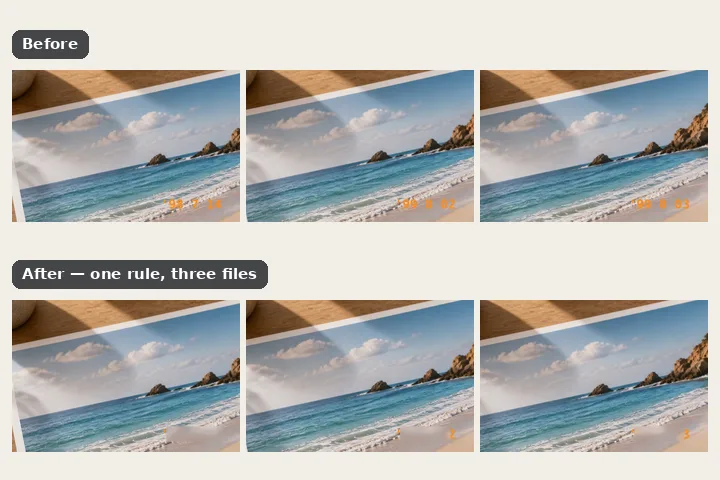
Drop a whole folder of pictures. There is no brush in a folder, so you state a rule — the film date imprint in each picture, a phone timestamp, dust on each scan, or a fixed box in one corner — and every file is solved against it on its own, with the ones that do not fit refused in their own row.
Why a folder needs a rule
Erasing is a hand operation: somebody paints, looks and paints again. A folder cannot be painted, and a batch that applied one painted region blindly to a hundred different frames would erase a piece of most of them. What a folder can have is a rule — the same orange imprint in the same corner of every scan from one roll, the same badge an app burned in at the same inset, the same dust on every frame from one scanner.
Each rule is solved per file and allowed to refuse. A rectangle measured on one frame size is never stretched onto another; a picture with no imprint gets nothing written; a dust proposal covering more than the share you set is held for review, because that much is texture, not dust. Every finished row reports what was covered, how far the pixels inside and outside moved in the file actually written, and how busy the surroundings were — the one honest hint about whether a fill is likely to be right.
Working it
- Drop the folder. Select or drop several pictures. Nothing is read until you press the button.
- Choose the rule. Film date imprint, carried rectangle, phone timestamp, dust and scratches, or a corner box with its size and inset.
- Choose the fill and format. Chosen per picture, edge march or patch search; PNG to keep every other pixel exactly.
- Run it. Rows fill in one by one: done, nothing found, refused (with why), or unreadable. A failure never stops the run.
- Download the ZIP. Named pictureeraser-batch with the date. Check the rows marked busy at 1:1 first.
What this mode will not do
- Only marks in a predictable place, or that the rules can detect, can be batched. Objects, people and anything that needs judgement are one picture at a time.
- The structure-aware model is not offered over a folder.
- Rules are heuristics: the imprint and timestamp searches miss some stamps and say so; the dust rule cannot tell dust from stars.
- Large folders take a while; files run one at a time to keep memory steady.
Questions about this mode
Are my pictures uploaded for batch processing?
Which engine does the batch use?
Why was a file refused?
Can it take out a phone timestamp from every photo?
Does it change pixels outside the mark?
Related ways in



Batch Erase