Remove handwriting from an image
Lift pen marks and scribbles off a page while the printed text stays put.
No photo handy?
FreeNo sign-upPhotos stay on your device
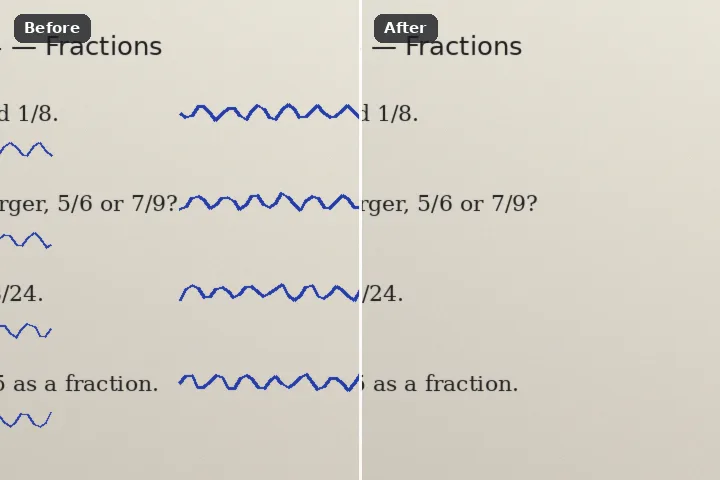
Select the pen by its colour across the whole page — blue ballpoint, black ballpoint, or both — with neutral printed text kept out of the selection, then fill with the tone of the paper around it. For a worksheet you want to reuse or a form you filled in by mistake.
Why pen and print can be told apart — mostly
Printed text is black toner or ink: dark and almost perfectly neutral. Ballpoint is not. Blue ballpoint is obviously blue, and black ballpoint is nearly always faintly blue or violet when you measure it. So a selection that takes dark pixels only when they carry some of that colour takes the pen and leaves the print — that is the keep printed text guard. Blue ink is a simpler window of hue and saturation.
What replaces the ink matters as much. Copying texture from elsewhere on a page puts fragments of other words where the handwriting was. The paper fill instead takes the brightest pixels near each ink stroke — the paper — and fills with their average, so a photographed page keeps its shading from one corner to the other and the cleaned area is just paper.
Do not alter certificates, mark sheets, identity documents or anything you will present as an original. This is for your own worksheets, notes and drafts.
Working it
- Choose the ink. Blue ink, Black ink or Both, in the Similar colour panel. Leave Keep printed text ticked.
- Check the selection. Zoom in. Anything printed that was taken — a coloured heading, a stamp — comes back with the restore brush.
- Erase with Paper fill. It is selected here. The strokes become the local paper tone.
- Look for crossings. Where pen crossed print, the print under the pen is replaced too, because the two cannot be separated there.
- Save as PNG or high-quality JPG. PNG keeps text edges crisp; a JPG at quality 92 or more is fine for printing.
What this mode will not do
- Where handwriting crosses printed text in a similar colour, the two inks cannot be separated; the printed letters under the pen are lost.
- Pencil is grey and neutral, like print, so the guard keeps it. Select pencil with the similar-colour click instead.
- Coloured printing — a blue heading, a red stamp — can be taken as ink. Take it back with the restore brush.
- Indentations and shadows the pen left in the paper are not ink and stay.
Questions about this mode
Is my page uploaded?
Which engine should I use for handwriting?
Will it remove the printed questions as well?
Can it remove pencil?
Is it all right to do this to an exam answer sheet or a certificate?
Related ways in